Your personal email account is your digital master key. It unlocks your social media, banking, shopping, and cloud storage. But with 95% of data breaches starting with compromised email accounts, protecting your inbox has never been more critical.
The threat landscape has evolved dramatically. AI-powered phishing attacks have increased by 47%, and new techniques like QR code phishing are bypassing traditional security measures. Generic security advice isn’t enough anymore.
This guide provides actionable, step-by-step practices specifically designed for individuals in 2025. You’ll learn how to build layered defenses that protect your digital identity without overwhelming complexity.
Ready to secure your digital life? Let’s start with the essentials.
The 2025 Email Threat Landscape: What You’re Up Against
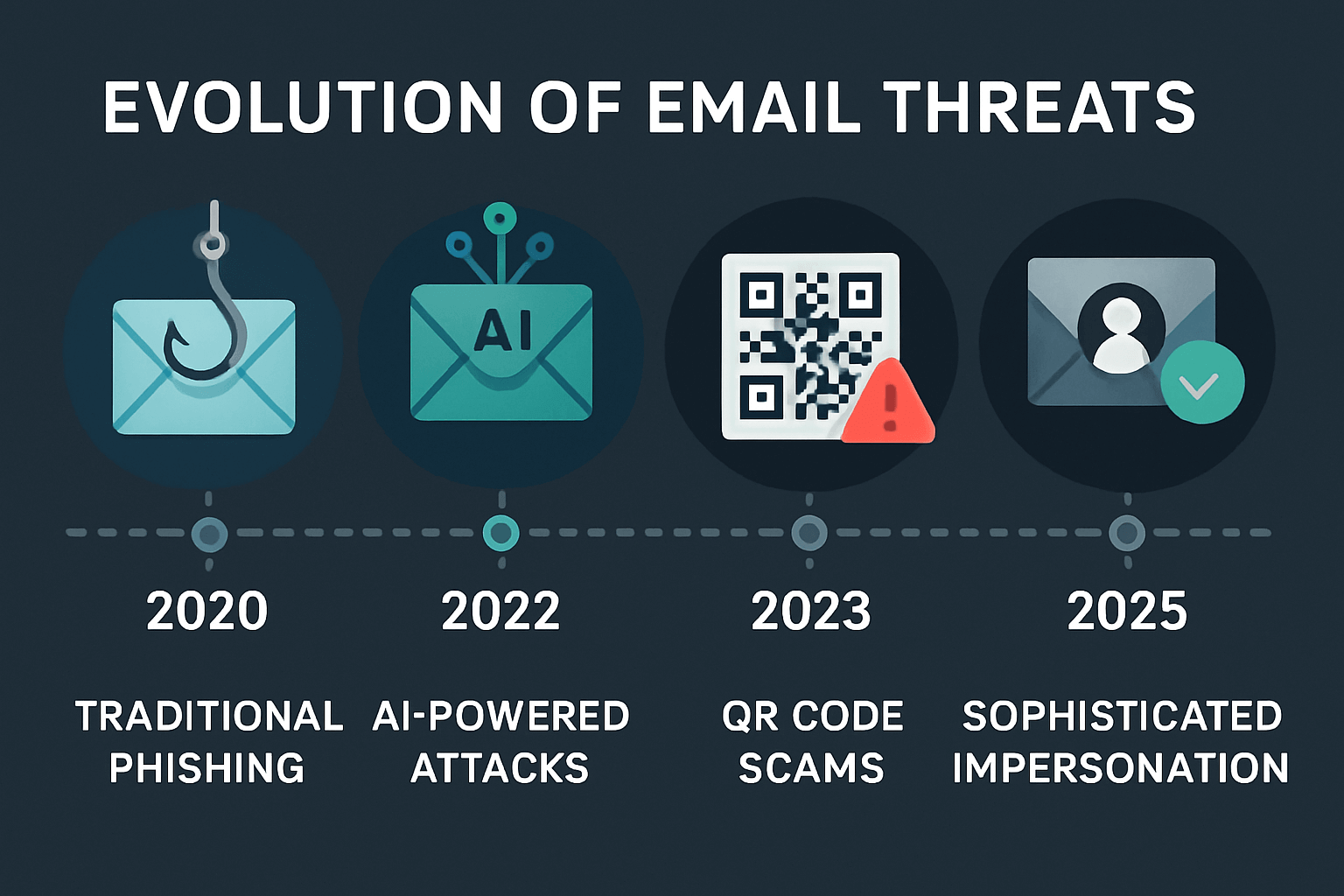
Before diving into solutions, you need to understand the evolving threats targeting your personal email:
AI-Enhanced Phishing Attacks
Cybercriminals now use generative AI to create perfectly written emails that mimic your friends, family, and trusted services. Traditional spelling and grammar red flags are disappearing.
QR Code Phishing (“Quishing”)
Attackers embed malicious QR codes in legitimate-looking emails. When scanned, these codes redirect you to fake login pages designed to steal your credentials.
Credential Stuffing from Data Breaches
When any service you’ve used gets breached, attackers test those stolen passwords against your email and other accounts. Password reuse is their biggest advantage.
Business Email Compromise (Personal Edition)
Scammers now target individuals with sophisticated impersonation attacks, pretending to be landlords, employers, or service providers to steal money or personal information.
The bottom line: Traditional email security approaches designed for 2020 won’t protect you in 2025.
Level 1: Essential Security Foundation (10-Minute Setup)
Start here if you’re new to email security or want quick wins that make an immediate difference.
1. Use Strong, Unique Passwords + Password Manager
The Problem: 91% of people reuse passwords, making one breach a gateway to all your accounts.
The Solution:
- Install a reputable password manager (1Password, Bitwarden, or Dashlane)
- Generate a unique, 16+ character password for your email account
- Never reuse your email password anywhere else
Quick Setup:
- Download your chosen password manager
- Create a strong master password you can remember
- Let it generate and store a new email password
- Update your email account immediately
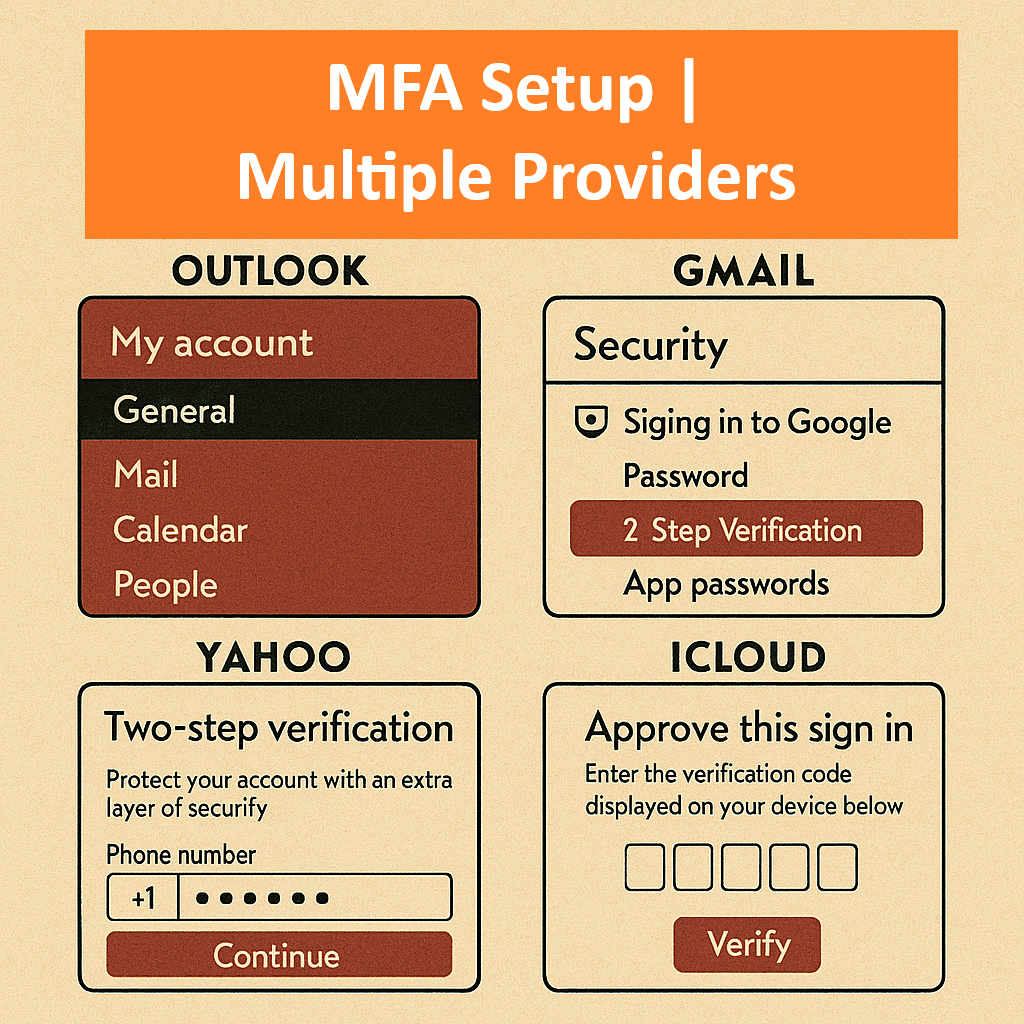
2. Enable Multi-Factor Authentication (MFA)
The Impact: MFA blocks 99.9% of automated attacks, even if your password is compromised.
How to Enable:
- Gmail: Settings → Security → 2-Step Verification
- Outlook: Security dashboard → Advanced security options
- Yahoo: Account security → Two-step verification
Best Practice: Use an authenticator app (Google Authenticator, Authy) instead of SMS when possible.
3. Recognize Modern Phishing Attempts
Key Warning Signs:
- Urgent action required (account will be closed, payment failed)
- Generic greetings (“Dear Customer” instead of your name)
- Suspicious sender addresses (hover over sender names to see actual email)
- Mismatched URLs (hover over links before clicking)
2025 Update: AI-generated phishing emails may have perfect grammar and spelling. When in doubt, verify independently by contacting the sender through a different communication method.
4. Review and Revoke Third-Party Access
Check your email account settings for connected apps:
- Gmail: Security → Third-party apps with account access
- Outlook: Privacy → App permissions
- Yahoo: Recent activity → Connected apps
Action: Remove any apps you don’t recognize or actively use.
Level 2: Advanced Protection (30-Minute Implementation)
Ready to build stronger defenses? These practices provide significant security improvements for moderate effort.
1. Choose a Security-Focused Email Provider
For Maximum Privacy:
- Proton Mail: End-to-end encryption, Swiss privacy laws
- Tutanota: Full encryption including subject lines
- Fastmail: Strong privacy, advanced features
For Enhanced Gmail Security:
- Enable Confidential Mode for sensitive emails
- Use Advanced Protection Program if you’re high-risk
- Configure enhanced phishing protection
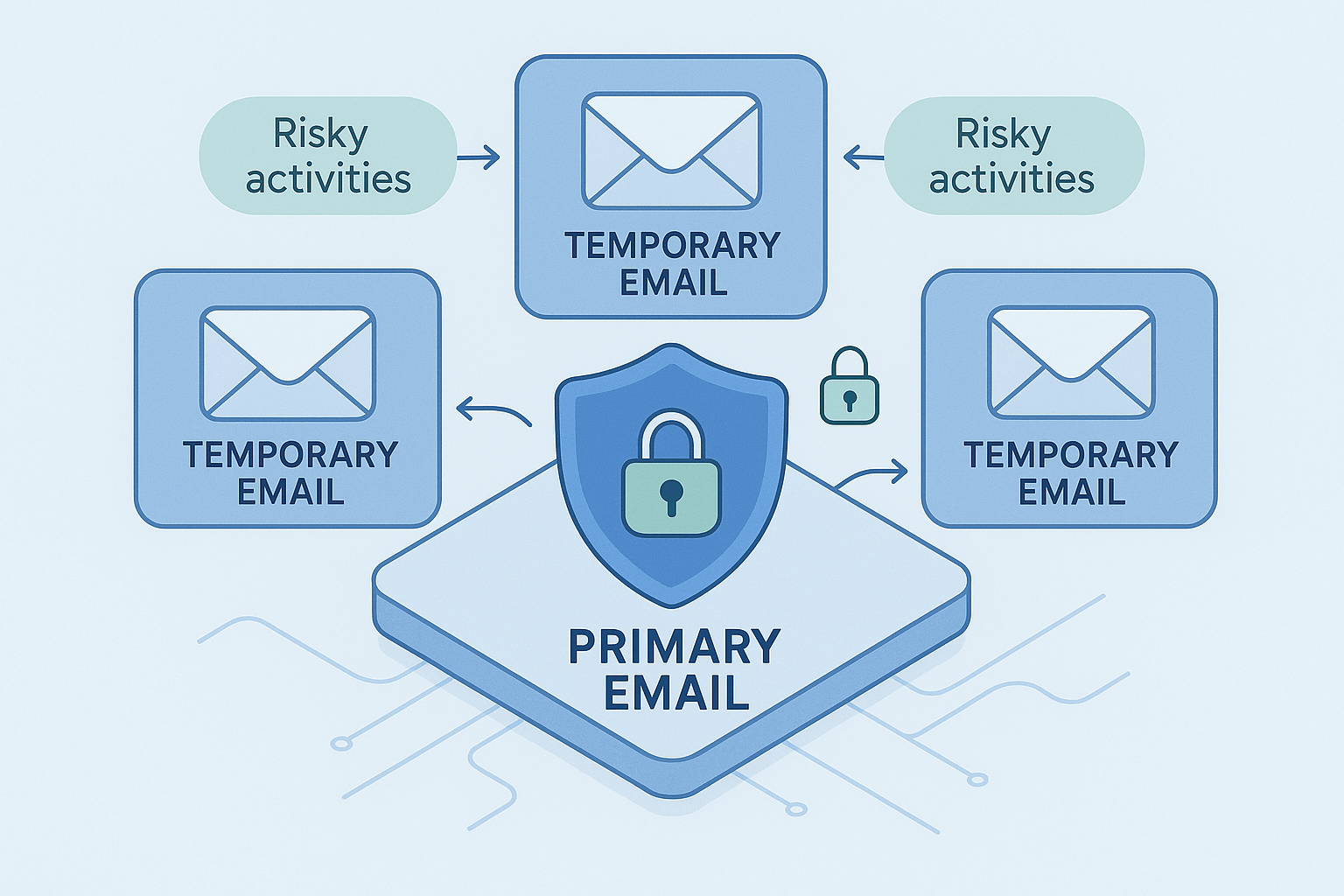
2. Implement Email Compartmentalization
The Strategy: Never use your primary email for risky activities.
High-Risk Activities Requiring Temporary Email:
- Online shopping on unfamiliar sites
- Downloading free resources or trials
- Signing up for contests or surveys
- Accessing public Wi-Fi that requires email verification
- Testing new services or apps
Why This Works: If a temporary email gets compromised or spam-flooded, your primary inbox remains clean and secure.
Professional Tip: Services like
NowTempMailprovide instant, secure disposable inboxes with zero data retention. This compartmentalization strategy is used by privacy professionals and cybersecurity experts to minimize exposure risk.
3. Understand Email Authentication (The Technical Backbone)
While you can’t directly control these as a recipient, understanding them helps you evaluate email security:
- SPF (Sender Policy Framework): Verifies authorized sending servers
- DKIM (DomainKeys Identified Mail): Adds digital signatures to prevent tampering
- DMARC (Domain-based Message Authentication): Tells servers how to handle authentication failures
What You Can Do: Choose email providers that properly implement these standards and display authentication warnings.
4. Use VPN for Email Access
When It’s Critical:
- Public Wi-Fi networks (cafes, airports, hotels)
- Traveling to countries with internet surveillance
- Accessing email from shared or untrusted devices
Quick Setup: Install a reputable VPN (NordVPN, ExpressVPN, Surfshark) and enable it before checking email on public networks.
Level 3: Expert-Level Security (Ongoing Practices)
For those who need maximum protection or handle sensitive information.
1. Enable End-to-End Encryption for Sensitive Communications
Options:
- Built-in: Use providers like Proton Mail or Tutanota
- Add-on: Install Mailvelope browser extension for existing accounts
- PGP: For technical users who need maximum control
When to Use: Financial documents, legal communications, personal health information, confidential business discussions.
2. Regular Security Audits
Monthly Checklist:
- Review recent login activity for unusual locations/devices
- Check for new connected apps or services
- Update passwords for any accounts that experienced breaches
- Clean out old emails containing sensitive information
Quarterly Actions:
- Rotate your main email password
- Review and update MFA settings
- Audit which services have your email address
- Update your password manager’s master password
3. Advanced Threat Monitoring
Tools to Consider:
- Have I Been Pwned: Monitor for data breaches involving your email
- Email security services: Advanced filtering and threat detection
- Dark web monitoring: Professional services that scan for credential leaks
4. Incident Response Planning
If You Suspect Compromise:
- Immediately change your password from a secure device
- Check recent activity and revoke suspicious sessions
- Enable additional MFA methods if not already active
- Notify contacts about potential spoofing attempts
- Monitor connected accounts for unauthorized access
Your 2025 Email Security Stack: Tools Comparison
| Security Layer | Free Options | Premium Options | Best for Temporary Email |
|---|---|---|---|
| Password Management | Bitwarden Basic | 1Password, Dashlane | N/A |
| Email Provider | Gmail with security features | Proton Mail, Tutanota | nowtempmail.com |
| VPN Protection | Proton VPN Free | NordVPN, ExpressVPN | Any reputable provider |
| Threat Monitoring | Have I Been Pwned | Dark web monitoring services | Built-in with secure providers |
| Authentication | Built-in MFA | Hardware security keys | Provider-dependent |
Frequently Asked Questions
Q: How often should I change my email password?
A: Change it immediately if there’s a breach, annually for good hygiene, or anytime you suspect compromise. With MFA enabled, the urgency decreases significantly.
Q: Is using temporary email really necessary for security?
A: Yes, especially in 2025. Email compartmentalization prevents your primary address from being exposed in breaches, spam lists, and tracking databases. It’s one of the most effective privacy and security practices you can implement.
Q: What’s the most important security practice if I can only do one thing?
A: Enable Multi-Factor Authentication on your email account. This single step blocks 99.9% of automated attacks and significantly reduces your risk profile.
Q: Should I trust email providers with built-in security features?
A: Major providers like Gmail and Outlook have excellent baseline security, but privacy-focused providers like Proton Mail or Tutanota offer stronger encryption and data protection for sensitive communications.
Q: How do I know if my current email security is adequate?
A: Run through our Level 1 checklist. If you don’t have MFA enabled, unique passwords, and a basic understanding of phishing recognition, your security needs immediate improvement.
Conclusion: Your Email Security is Your Digital Foundation
Email security in 2025 isn’t about paranoia—it’s about practical protection for your digital life. The threats are real and evolving, but the defenses are straightforward and accessible.
Start with Level 1 practices today. Enable MFA, use unique passwords, and begin implementing email compartmentalization with temporary addresses for risky activities.
Your digital security is only as strong as your weakest account. Don’t let your email be that weak link.